


As I start composing this article, it's November – about the time I consider my New Year’s resolutions. I make several resolutions with the idea that I will succeed with at least 50% of my commitments. How about you?
One of the promises I make to myself involves being more organized. Last year we fulfilled my desire to get all of our personal legal documents in place. I’ve included the links at the end of this article to our three-part series on that topic.
For 2020, one of my resolutions is about our medical records. We are inundated with paper and electronic information about our medical lives to the point where it can feel overwhelming on where to find information when you need it. And then there is the risk of identity theft and fraud from stolen health information.
In this two-part series, I will share with you the research I've come across on what medical records to save, how long to keep them, and storage methods.
Part One of the series explores what records to save and how long.
Part Two (click here) examines traditional and electronic methods to store your medical records.
An unexpected hospital visit for my husband earlier this month showed us how important it is to have your medical information easily accessible. It does not seem to matter that when you show up at a medical facility you had visited recently, you expect them to have all of this information. You must recite your medications and medical history from memory as if it's a test you must pass to be treated.
We came prepared and pulled out our medical cheat sheet. On it, we had listed a pharmaceutical profile (medication, dosage, when prescribed and by whom) and dates of past medical or surgical events, such as routine procedures or acute illness (e.g., kidney stone).
I keep the information in a document on our computer and update it each time there is a notable change or event, such as an ER visit. My husband and I each keep a printed copy (small font, paper trimmed down) folded in our wallet and purse, respectively. When we show up for an appointment or the unexpected hospital visit, it's merely a matter of handing it over so the medical tech can copy it and place it in the chart.
What to Keep and What to Toss
When you leave your appointment or hospital stay, you come home with reams of paper: discharge instructions, follow up appointments, who to call if you have questions. Then the bills arrive, and you try to figure out who you are writing a check to and why.
Each state has laws related to how long medical doctors and hospitals are required to retain your medical records. You can read more about your state by clicking here. Generally, documents are kept for a minimum of six years, but in some situations are retained even longer.
You should also retain copies of your records for your own reference and ease of access. Use these guidelines to help decide what paperwork you need to keep, for how long, and how to get rid of it when it’s no longer needed.
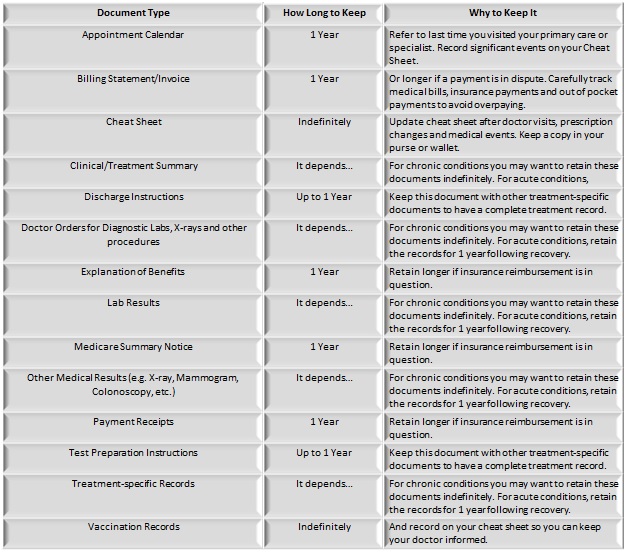
With these handy guidelines from Sharecare.com and AARP to help manage the paperwork, the next question is HOW to handle the paperwork. Paper versus electronic?
Part Two of this series will help answer the pros and cons of each record retention method to help you determine which way is best for your situation.
Resources on Personal Health Records:
More tips to organize and store paper medical records can be found here. https://www.recordnations.com/2016/03/organizing-paperwork-what-is-the-best-way-to-store-your-papers-and-documents/
Taking a holistic view of personal health records - https://hitconsultant.net/2019/04/19/what-the-failure-of-microsofts-healthvault-means-for-the-future-of-ehrs/#.Xd5Y0-hKg2w
Health record privacy and Apple Fit – read here. https://www.npr.org/2019/02/27/697026827/storing-health-records-on-your-phone-can-apple-live-up-to-its-privacy-values
Want to learn more about Apple Health versus Google Fit apps? Click here. https://www.biotaware.com/blog/google-fit-vs-apple-health-and-how-they-fit-digital-health-industry/
For a comprehensive guide on PHR apps from the perspective of a medical practice, click here.
If you have a question, comment, or idea for an article, email us at [email protected].
Read more:
Estate Planning Essentials Part 1: Wills, Trusts and Letter of Intent
Estate Planning Essentials Part 2: Durable Power of Attorney and Health Care Power of Attorney
Estate Planning Essentials Part 3: Beneficiary and Guardian Designations